الرئيسية بلوق الصفحة 5

How to Use Satellite Messaging on iPhone When Cellular Service is Down

0
Satellite Messaging on iPhone

In today’s world, smartphones often feel like the Swiss Army knives of the 21st century. But without a cellular or data connection, they can quickly turn into useless “bricks” that we anxiously check for any sign of a WiFi or cell signal. Fortunately, newer iPhones with iOS 18 offer a solution through satellite connectivity, keeping you connected even in the most isolated places.

Whether you’re dealing with a sudden outage, a natural disaster, or find yourself in a remote area, iPhones running iOS 18 and above have the ability to connect to satellites. This allows iPhone owners to send non-emergency texts via iMessage and SMS. The iPhone 14 and later models also feature “Emergency SOS” to reach emergency services through satellite. Google’s Pixel 9 has a similar capability.

If you need to temporarily restore basic messaging—including texts, emojis, and Tapbacks—using a satellite connection, follow these steps:

Step-by-Step Guide to Satellite Messaging

Step 1: Test the Satellite Connection with a Demo
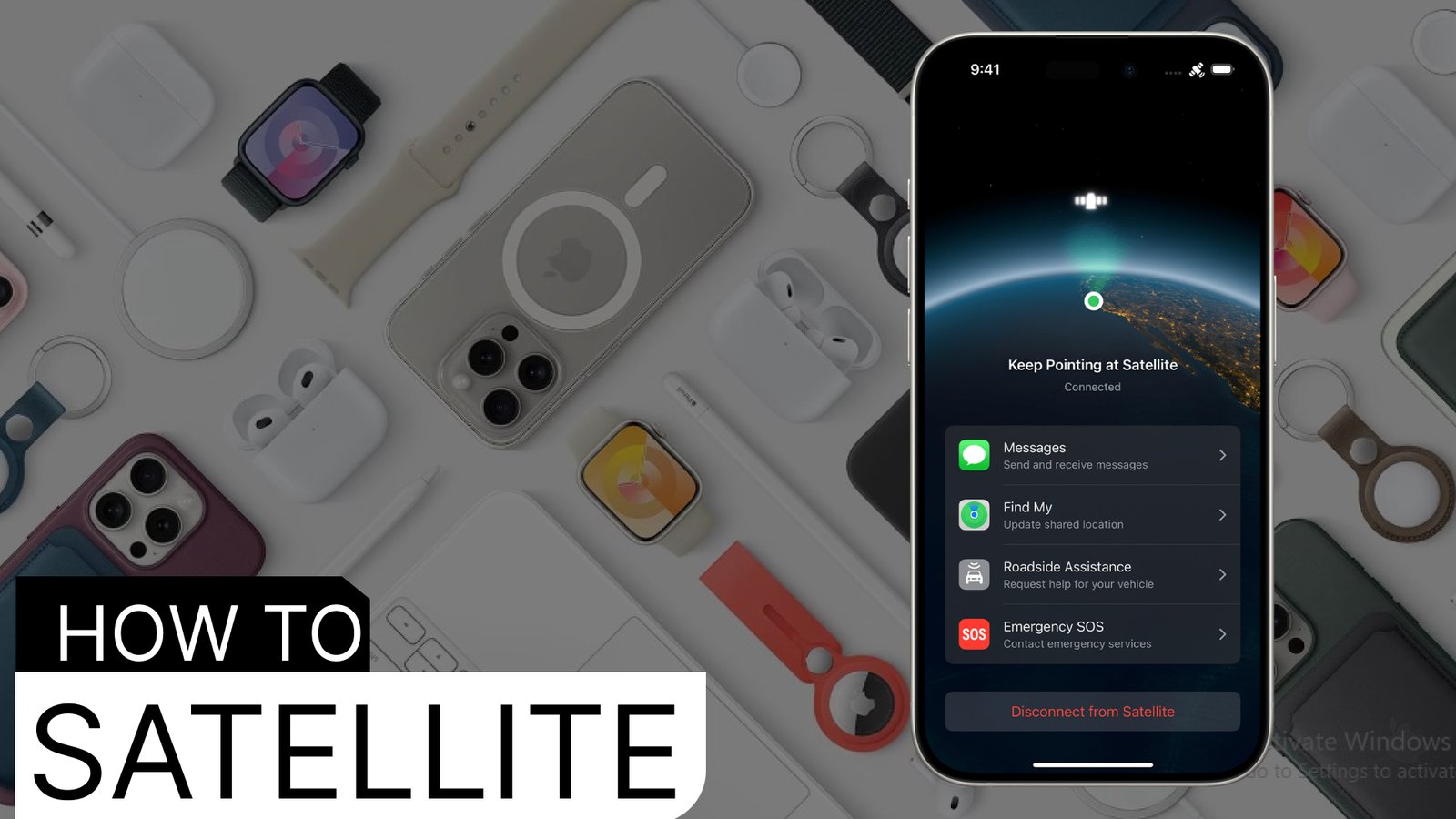
It’s a good idea to familiarize yourself with the satellite connection before you lose service. Access the satellite demo from the control center by tapping the cellular button. From there, select the satellite option and choose “try connecting to satellite.” Follow the onscreen instructions to test the connection.

Step 2: Enable iMessage
Make sure iMessage is switched on before losing your signal. This is a crucial step since iMessages need to be active to utilize satellite services.

Step 3: Set Up Emergency Contacts and Family Sharing
To stay in touch during an emergency, set up an emergency contact and enable family sharing. Messages from these contacts will arrive as soon as you connect to a satellite. Keep in mind that they need to be using iOS 17.6 or later, or a compatible non-Apple device.

Step 4: Confirm Satellite Connection When Prompted
If your phone detects no cellular or WiFi service, a notification will appear, giving you the option to connect to a satellite. You may also receive this prompt in the Messages app. Upon connection, you’ll have the option to reach emergency services using the Emergency SOS feature.

Step 5: Open the Messages App
Sending texts through satellite is as simple as opening the Messages app. If you haven’t yet received any messages, you’ll get a prompt with instructions to connect. The iPhone 14 Pro and newer models feature Dynamic Island, which displays indicator dots to show connection strength. You may need to adjust your position slightly to improve the connection, following onscreen arrows. For more guidance, tap the Dynamic Island to access the Connection Assistant.

Additional Tips for Satellite Messaging

  • Free for Two Years: Satellite connectivity is free for two years after activating an iPhone 14 or newer model.
  • Clear View of the Sky: A clear view of the sky and horizon speeds up message delivery. Obstacles like trees can slow things down, taking anywhere from 30 seconds to over a minute for a message to send. Avoid blocking your phone’s view by keeping it out of pockets or bags during connection.
  • Message Delivery Timing: SMS messages sent to you before you establish a satellite connection will be delivered once you’re connected. For iMessages, the sender needs to manually resend them via satellite after you’ve connected.
  • Limited Features: Not all messaging features are supported—photos, videos, audio notes, and group texts won’t work over satellite.
  • Latitude Limitations: In areas above 62° latitude, like parts of northern Alaska, satellite connectivity might not function.

Stay prepared by familiarizing yourself with your phone’s satellite features—this can make all the difference in staying connected when traditional networks are out of reach.

Read more: How to Hide Apps on Your iPhone: iOS 18 and Earlier Versions

Iphone user guide will help too.
Boost Your X (Twitter) Engagement: A Step-by-Step Guide to Leveraging Trending Content

1
Boost X (Twitter) Engagement

To boost your X (formerly Twitter) impressions and engagement, focusing on trending content is a smart strategy. Here’s a step-by-step guide to help you leverage trending topics effectively:

1. Identify Trending Content

  • Explore Trending Hashtags: Use the Trending tab on X to discover what’s popular. It shows hashtags, keywords, and discussions that are gaining traction.
  • Tailor Trends by Location: You can adjust your trending topics to a specific location by changing the settings in the “Explore” section.
  • Monitor Competitors & Influencers: Keep an eye on accounts in your niche. Observe what they’re posting about and which topics generate the most engagement.
  • Use Tools for Insights: Consider using third-party tools like TweetDeck, Trendsmap, or Hashtagify to get detailed insights on trending topics and related hashtags.

2. Craft Engaging Posts

  • Personalize the Trend: When posting about trending topics, add your unique spin, perspective, or expertise. Make sure it aligns with your niche.
  • Use Visuals: Use images, videos, or GIFs to grab attention. Tweets with visuals tend to get more impressions and engagement.
  • Leverage Polls & Questions: Ask questions or create polls related to the trending topic to encourage interaction. It’s a simple way to boost engagement.
  • Include Relevant Hashtags: Use 2-3 relevant hashtags tied to the trending topic, but don’t overdo it. Avoid using hashtags that aren’t closely related to your content.

3. Reply to Trending Content

  • Add Value in Replies: Reply to trending tweets, especially from well-known accounts, by adding value or a unique perspective. Make sure your reply is engaging enough to encourage others to like, retweet, or reply.
  • Use Humor or Wit: A light-hearted or humorous reply can go viral, but ensure it’s appropriate and relevant.
  • Tag Influencers: If relevant, tag influencers in your industry to draw their attention to your tweet. Make sure your content is worth their notice.

4. Post at Optimal Times

  • Use analytics tools like X Analytics or Buffer to identify when your audience is most active.
  • Schedule your posts during peak times to maximize engagement and impressions.

5. Engage Consistently

  • Post Regularly: Maintain a consistent posting schedule, and interact with your followers regularly.
  • Reply Promptly: When someone replies to your post, respond quickly to keep the conversation going.
  • Retweet & Quote Tweet: Retweet relevant trending content or use the “Quote Tweet” feature to add your thoughts, making the content more engaging.

6. Use Analytics to Measure Success

  • Track the performance of your posts through X Analytics. Focus on metrics like impressions, engagements, retweets, and likes.
  • Identify which types of content are getting the most engagement and adjust your strategy accordingly.

7. Use X Ads (Optional)

  • Consider running X ads targeting specific trending hashtags or interests. This can be effective if you have a budget and want to reach a broader audience quickly.

Key Tips for Boosting Engagement

  • Be Timely: Engage with trending content as soon as it starts gaining traction. Early involvement often results in higher engagement.
  • Provide Value: Add something insightful, entertaining, or educational to the conversation.
  • Be Authentic: Your followers will appreciate genuine thoughts rather than simply jumping on a trend for visibility.
  • Engage with Replies: If your tweet gets traction, make sure to interact with those who comment or reply. Keep the conversation alive!

You might like: How Does Twitter Rate Limit Work

Read twitter blog for more

Android 15 Launches with Privacy Upgrades, Satellite Connectivity, and More

0
Android 15 launch

Android 15 Launch Brings New Privacy Features, Satellite Connectivity, and Enhanced Performance

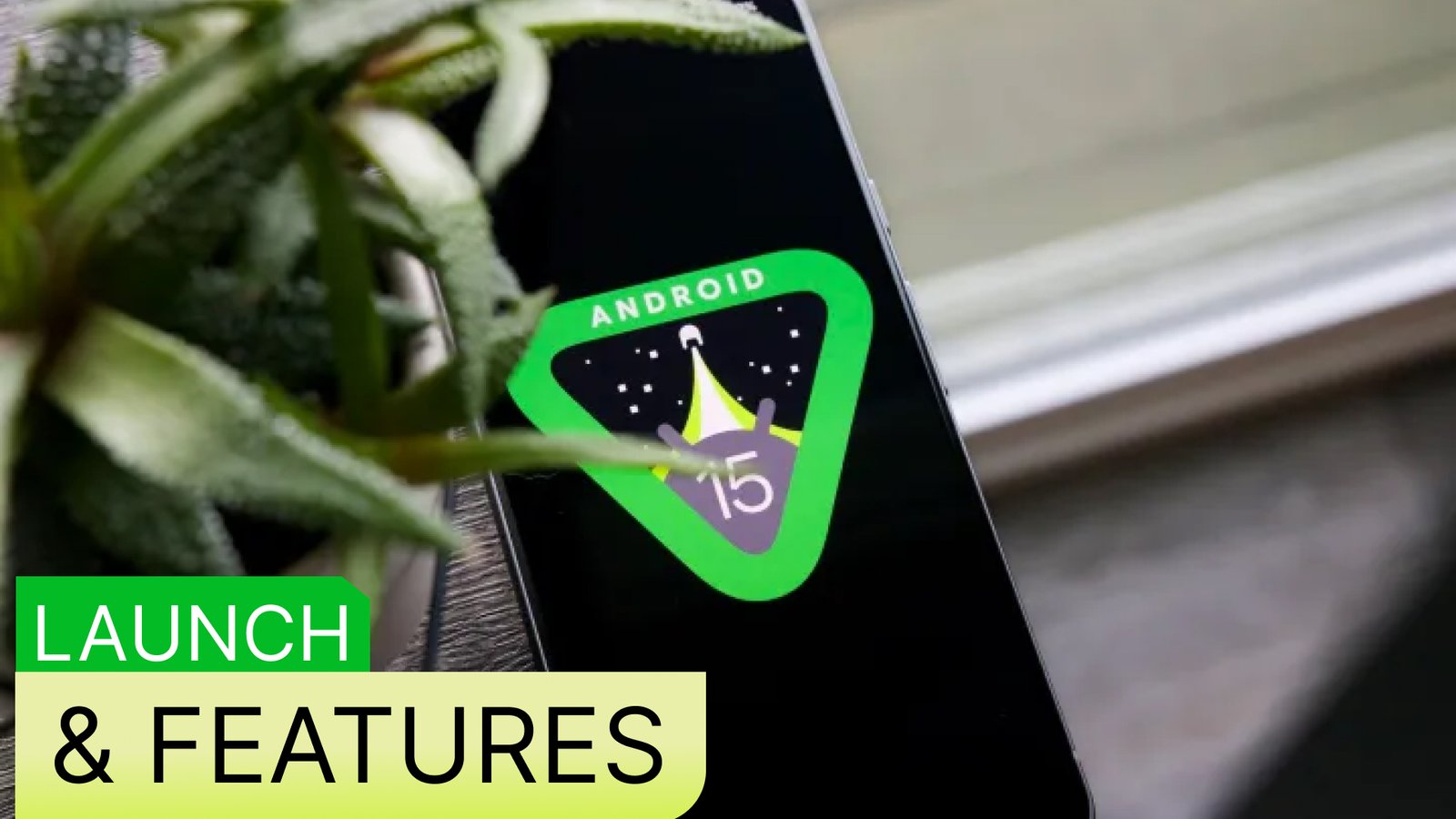
Google’s latest Android update has officially arrived. Android 15 was released to Pixel devices on October 15, and other Android smartphones will receive the update in the coming months. While there are no major visual changes, Android 15 focuses on refining the user experience with interface improvements and upgraded features. Under-the-hood changes also add value, with new tools designed for privacy, connectivity, and everyday usability.

Enhanced Privacy Features with Android 15

One of the standout additions in Android 15 is the new Private Space, a secure vault that allows users to separate work-related apps and files from personal data. It’s like having two devices in one — without the need for specialized apps. Private Space is currently exclusive to Pixel phones and can be accessed via the Pixel Launcher. Google’s emphasis on privacy makes it easier to protect sensitive apps, such as social media, banking, and dating services, with a dedicated space on your device.

Improved Satellite Communication Capabilities

Android 15 also introduces better satellite communication options. The update expands beyond Google’s Pixel 9 series, enabling other devices with the appropriate hardware to communicate via satellite. This feature goes beyond emergency situations, allowing messages to be sent without a Wi-Fi or cellular connection. As expected, the technology’s availability will depend on carrier support, with more details likely to emerge soon.

Availability of Android 15

Google’s Pixel devices, including the Pixel 6 and newer models, were the first to get Android 15. Other manufacturers are adapting their own versions of the update, with brands like OnePlus, Oppo, and Samsung already showcasing Android 15-based interfaces. Some companies, like Motorola and Vivo, have initiated beta programs for testing the update, while Xiaomi remains silent on its plans.

Notable New Features in Android 15

  1. Predictive Back Navigation: Android 15 improves the back gesture experience, previewing the previous screen to avoid accidental navigation. Although still limited to a few apps, this feature is likely to expand.
  2. Partial Screen Recording: A new screen recording tool lets users select specific apps to record, preventing sensitive information from being captured inadvertently.
  3. App Pairs: Multitasking gets a boost with app pairs, allowing users to save app combinations and launch them in split-screen mode with a single tap.
  4. Notification Cooldown & Adaptive Vibration: Android 15 introduces tools to manage notifications better, including reducing alert volume when receiving multiple notifications in quick succession. Adaptive vibration minimizes distraction when your phone is idle.
  5. HQ Webcam Mode: Enhancements to webcam functionality now offer sharper video quality, making your Android device a reliable webcam for virtual meetings and streaming.
  6. USB Lockdown: A security upgrade in lockdown mode now blocks USB access to file storage, preventing unauthorized access or data theft when your phone is physically connected to a computer.

Additional Updates to Android 15

Android 15 also includes minor yet practical additions, like manual app archiving, allowing you to free up space without deleting app data. This builds upon previous storage management features, giving users more control over device performance.

As Android 15 continues to roll out, more manufacturers will provide updates and information on compatibility. Check if your device is eligible for Android 15 to start enjoying the latest privacy, connectivity, and interface upgrades.

In summary, Android 15 aims to improve privacy, enhance communication options, and fine-tune usability. Keep an eye out for future updates from your phone’s manufacturer to access all the new features and improvements.

Shop Google Pixel

Read more: Android 15 Launches with Major Privacy and Safety Features for Pixel Phones

Midjourney Expands Image Editor for External Photos with New Tools and Advanced Moderation

0
Midjourney expands image editor

Midjourney has announced an exciting expansion to its image editor, rolling out new features for a limited group of users. With this update, users can now edit externally uploaded images within Midjourney, adding versatility to its editor beyond generative AI images. This shift brings Midjourney closer in functionality to advanced photo editing software, making it a potential alternative to programs like Photoshop or Affinity.

Today, Midjourney has launched two major features for testing: an editor for uploaded images and re-texturing capabilities, allowing users to explore materials, textures, and lighting within their images. These updates integrate seamlessly with Midjourney’s other advanced features, such as style references, character customization, and personalized models.

While Adobe has been integrating AI tools into software like Photoshop and Lightroom, Midjourney’s new editor opens doors to adjust external images in various ways. Users can modify lighting, textures, and even remove or add objects to images — think transforming a cozy living room scene into a nighttime shot with adjusted colors and enhanced lighting.

Midjourney has stated that this external editing capability is currently available only to select members: those with annual subscriptions, members subscribed for at least 12 months, or those who have generated over 10,000 images. Additionally, it’s exclusive to Midjourney 6.1, with a phased rollout to ensure smooth user experience and moderation.

Beyond photos, Midjourney’s updated editor can now process sketches or hand-drawn images, converting them into polished, AI-enhanced visuals. Although some professional artists may prefer traditional tools for finer adjustments, Midjourney’s editor covers the essentials with impressive accuracy, making it a strong option for creatives.

For those interested in exploring Midjourney’s new features, check out our comprehensive guides on using Midjourney’s AI image editor and maximizing results with our top tips for Midjourney — practical steps that will help you get started with this evolving tool!

Read more: Mastering Google Gemini: How to Craft the Perfect Prompts for Optimal Results

Visit: Midjourney

Discover the Best iPhones of the Year: iPhone 16 and iPhone 16 Pro

0
best iPhones of the year

Exploring the Best iPhones of the Year: iPhone 16 & iPhone 16 Pro

Imagine having an AI assistant right on your phone, capable of analyzing documents, writing emails, and creating content. This future is not far off with Apple Intelligence, and the latest iPhones are paving the way.

While the newest iPhones offer innovative technology, older models like the iPhone 15 remain solid choices, delivering premium features at a more budget-friendly price point. Unique colors available on older models also add an appeal that newer versions lack.

If you’re in the market for a new iPhone, we’ve got you covered. Our top pick for most people is the iPhone 16, but whether you’re looking for the best value, cutting-edge features, or even considering switching to Android, we’ll help you find the perfect match.

Here’s a breakdown of the best iPhones of the year:

iPhone 16: The Best iPhone for Most People

Pros:

  • Fresh, vibrant design
  • Exciting color options
  • Intuitive Camera Control
  • Customizable Action button
  • Excellent camera system
  • Dependable battery life

Cons:

  • 60Hz display, no always-on option
  • Slow charging speeds
  • Apple Intelligence still unavailable

Why buy it? It’s the best iPhone for the majority of users, offering an exceptional balance of performance and design. Plus, the stunning color choices this year add a fun element.

Who is it for? Anyone who wants a great new iPhone without needing all the advanced camera features of the Pro series.

Apple has raised the bar with the iPhone 16, which is more than just the “budget” model of the lineup. With a refreshed design and a powerful A17 Bionic chip, it handles demanding tasks with ease. Although it lacks the Pro’s telephoto lens, the iPhone 16 still captures impressive photos, especially in low light. The Action button and Camera Control make for a highly customizable user experience, allowing for quick access to camera settings and other shortcuts.

While it does miss out on some premium features like a 120Hz ProMotion display, its lower price and excellent performance make it an ideal choice for most users.

iPhone 16 Pro: The Best Small Flagship iPhone

Pros:

  • Enhanced Camera Control
  • High-quality display and performance
  • 5x telephoto camera
  • Photographic Styles
  • 4K video at 120fps

Cons:

  • Mediocre battery life
  • No Apple Intelligence integration yet
  • The iPhone 16 offers excellent competition

Why buy it? It offers all the premium features of a flagship iPhone, but in a more compact form factor.

Who is it for? If you want top-tier performance and features in a smaller device, the iPhone 16 Pro is a perfect fit.

The iPhone 16 Pro continues Apple’s tradition of excellence in the Pro lineup, offering premium features such as a smooth 120Hz ProMotion display and an advanced camera system. It’s perfect for users who prioritize display quality and camera versatility. However, with the iPhone 16 delivering such a strong all-around performance, the decision to upgrade to the Pro is less straightforward this year.

Both the iPhone 16 and 16 Pro come with the latest iOS software, the customizable Action button, and Camera Control. The real differentiators for the Pro model lie in its superior display and enhanced camera capabilities, including a telephoto lens that adds versatility for photography enthusiasts.

Ultimately, if you need the most advanced features, the iPhone 16 Pro is worth the investment. But for most users, the iPhone 16 offers an excellent experience at a more affordable price, making it our top recommendation.

Read also: iPhone SE 4: Release Date, Price, Design, and Features

Visit Apple store

Tesla Faces Lawsuit for Alleged Copyright Infringement Over “We, Robot” Presentation

0
Tesla copyright infringement

Tesla’s recent “We, Robot” presentation has sparked legal trouble, with Blade Runner 2049 production company, Alcon Entertainment, suing both Tesla and its CEO, Elon Musk, for copyright infringement. The October 10 event, held at Warner Bros. Discovery Studios, featured Tesla’s new Cybercab, Robovan, and an update on its Optimus humanoid robot.

Alcon claims that Tesla used generative AI and images from Blade Runner 2049 without permission, despite a last-minute request for authorization, which was denied. The production company cited concerns over Musk’s controversial behavior and did not want to associate the film with him or his companies. Following the rejection, Tesla is accused of generating a Blade Runner-inspired image with AI, which was displayed during the presentation.

Musk referenced Blade Runner 2049 during the event, linking it to his vision of the future, but Alcon remains firm in its lawsuit, accusing Tesla of copyright violation. As of now, Tesla and Musk have yet to respond publicly to the lawsuit, and the amount of damages sought by Alcon is unclear.

Visit: Tesla

You might like: Changes on X Drive Users to Bluesky Amid Controversial Updates

Tesla copyright infringement

Mastering Google Gemini: How to Craft the Perfect Prompts for Optimal Results

1
Crafting effective prompts for Google Gemini

In the rapidly expanding world of AI assistants, Google Gemini stands out for its impressive range of features. Whether it’s summarizing a YouTube video, curating a playlist based on your mood, or helping you score the cheapest flights, Gemini can handle it all. But getting the best results from Gemini isn’t as simple as it sounds—it depends on how you phrase your queries.

If you’ve ever struggled to get a useful response, you’re not alone. Many people find that formulating the right prompts can be challenging. That’s why crafting your questions carefully is crucial. In this guide, we’ll explore how to structure effective prompts for Gemini to unlock its full potential.

Let’s dive in!

1. Provide Context

Think of your interaction with Gemini like a conversation with a well-informed friend. To get the best responses, ask your questions in full sentences rather than just keywords. For instance, instead of typing “email writing tips,” try: “I need to write an email to my boss about a project delay. Could you provide advice on how to explain the situation professionally and propose a solution?”

This approach gives Gemini the context needed to offer more specific, actionable advice.

2. Explain Your Objective

Be clear about your end goal when seeking assistance. This helps Gemini tailor its responses to your needs. For example, instead of asking, “How to create a spreadsheet?”, try something like: “I need to create a monthly budget spreadsheet to track my personal expenses and savings goals. Can you guide me on how to set this up in Google Sheets, including suggested categories and formulas?”

3. Ask for Step-by-Step Guidance

For tasks that involve multiple steps, request detailed instructions. Instead of saying, “How to change a tire?”, phrase it as: “Can you provide a step-by-step guide on how to change a flat tire on a standard passenger car?”

This ensures you receive comprehensive instructions that are easy to follow.

4. Indicate Your Knowledge Level

Let Gemini know how familiar you are with the topic at hand. This helps tailor the response to your level of understanding. For example, instead of asking, “How does photosynthesis work?”, you could say: “I have a basic understanding of photosynthesis. Can you explain it in more depth?”

Alternatively, if you’re a beginner, don’t hesitate to specify that: “I’ve never understood how the stock market works. Can you explain it from the very basics?”

5. Mention Specific Tools or Platforms

When your query involves specific software or devices, mention them in your prompt. For example, rather than asking, “How do I organize my email?”, say: “Can you provide tips on using labels and filters in Gmail to better organize my work emails?”

If you’re an iPhone user, you might ask: “What are some hidden features in iOS 18 for iPhone 16 that can boost productivity?” This way, Gemini can give you advice that’s directly relevant to your tools.

Bonus Tip: Keep It Concise!

While providing context and detail is key, try to keep your prompts under 4,000 characters. The goal is to include enough relevant information while staying concise.

A well-structured and focused prompt leads to more accurate and helpful responses from Gemini. Happy prompting!

visit Gemini

Read also: Anticipating Major Updates for ChatGPT and Claude: What to Expect

AtomMan G7 Ti: A Mini Gaming PC That Packs a Punch — Smaller and Faster Than a PS5

0
Mini gaming PC smaller and faster than PS5

Pros:

  • Blazing fast performance
  • Compact, a third the size of a PS5
  • Affordable pricing
  • No unnecessary bloatware
  • Bare-bones option available for customization

Cons:

  • Lacks sufficient USB ports
  • Fans can get noisy under heavy load

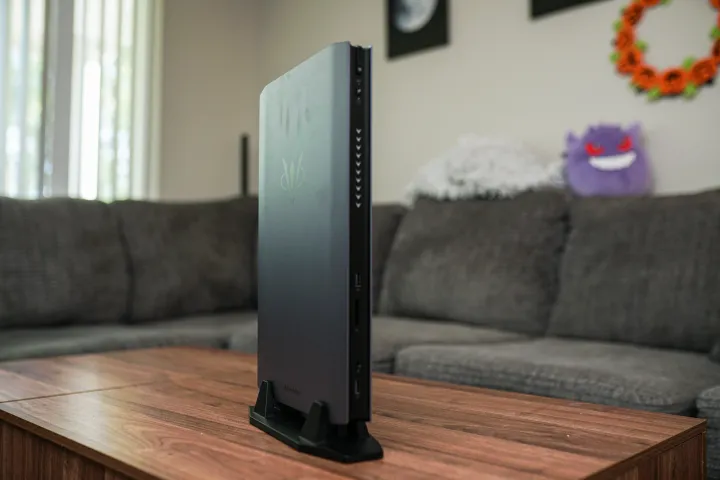
There’s something captivating about mini PCs, and the AtomMan G7 Ti delivers on that appeal. One of the smallest gaming desktops I’ve tested, it houses a 24-core Intel Core i9-14900HX and an RTX 4070, giving it enough power to rival the best full-sized gaming PCs. Despite using mobile components and having an ultra-compact design, this tiny powerhouse offers competitive performance at a significantly lower price.

Compact but Mighty

The AtomMan G7 Ti is equipped with high-end mobile hardware, including an Nvidia RTX 4070 with 140W TGP, and either a 16-core Intel Core i7-14650HX or a 24-core Intel Core i9-14900HX. You can also opt for a bare-bones version, letting you add your own memory and storage. In the full configuration, the price starts at $1,439 for the Core i9 variant or $1,159 for the Core i7. This is significantly cheaper than comparable models from competitors like Asus ROG NUC, making it an excellent value for gamers.

Impressive Build Quality

The AtomMan G7 Ti’s design is sleek and durable, boasting a mostly aluminum chassis and a compact footprint—about a third the size of a PS5, but with more power. The PC features perforated side panels for efficient airflow, RGB lighting options, and a sturdy vertical stand, though it lacks a horizontal setup option. Inside, the machine supports two M.2 SSDs and dual-channel DDR5 RAM, allowing you to customize and expand storage.

Performance Without Compromise

In terms of raw speed, the AtomMan G7 Ti is a beast. Despite its compact size and reliance on mobile components, it outperforms some full-sized desktops in gaming benchmarks. Whether running graphically demanding games or performing intensive tasks like video editing, the AtomMan G7 Ti delivers stellar performance without thermal throttling. It also offers the flexibility of switching between Game and Desktop modes via a dedicated button, which adjusts the power and fan speed to suit different workloads.

Minimal Bloatware, Maximum Gaming

The AtomMan G7 Ti comes with a clean installation of Windows 11, free of unnecessary bloatware. The only additional software is the AtomMan Control Center, which lets you adjust power settings and RGB lighting but is otherwise non-intrusive. This makes for a refreshing experience compared to mainstream PCs that often come loaded with pre-installed software.

Conclusion

The AtomMan G7 Ti is an exceptional mini gaming PC, offering high-end performance in an incredibly small form factor. With competitive pricing and the ability to customize components, it’s a top choice for gamers seeking a compact yet powerful machine. While it could benefit from more USB ports and quieter fans, its overall value, speed, and build quality make it a standout option in the mini PC market.

Amazon

Changes on X Drive Users to Bluesky Amid Controversial Updates

1
Changes on X Drive Users to Bluesky

In recent developments, significant changes on X have led users to flock to its decentralized competitor, Bluesky. The platform announced that it gained 500,000 new users in a single day, a spike seemingly tied to controversial updates made by X in the past week.

One of the major changes affecting users is the modification to the block feature. X users were notified this week that people they’ve blocked can still view their posts, though they cannot interact with them. This alteration marks a significant shift in the platform’s safety tools and has raised concerns about increased vulnerability to harassment.

X justified the update by claiming that the new system provides more transparency, stating, “Today, block can be used by users to share and hide harmful or private information about those they’ve blocked. This update allows users to see if such behavior occurs.” However, critics argue that blocking is a crucial safety feature, especially for individuals seeking protection from harassment or needing to create personal distance. Despite concerns, the change aligns with Elon Musk’s previously expressed dissatisfaction with the block function, which had been hinted at earlier.

Bluesky seized this moment of user frustration, leveraging the changes as a recruitment opportunity.

Meanwhile, updates to X’s terms of service have also sparked unease. The most recent version includes a new clause allowing the platform to use user data for training machine learning and AI models, a significant departure from earlier policies. Additionally, disputes with X must now be handled in the US District Court for the Northern District of Texas, a venue previously presided over by a judge with ties to Tesla.

The new terms of service are scheduled to take effect on November 15th, adding further uncertainty for X’s user base.

As the platform navigates these changes, Bluesky’s rapid growth suggests that users are seeking alternatives. Meta, which owns Threads, has yet to comment on whether it experienced similar growth.

Finally, SocialAI creator Michael Sayman shares insights into his innovative app, which offers a new twist on social networking by removing human interaction altogether. He discusses how AI-driven platforms like his may reshape how we think about online communities and social engagement.

Visit Bluesky

Read also: How Does Twitter Rate Limit Work

Anticipating Major Updates for ChatGPT and Claude: What to Expect

1
updates for ChatGPT and Claude

Rumors are swirling that significant updates to two leading AI chatbots, ChatGPT and Claude, are on the horizon. The speculation suggests that in the next couple of weeks, we could see substantial upgrades to their underlying models, pushing the boundaries of what AI can do.

One of the most prominent rumors centers on updates to the AI models that power both platforms. For Claude, many expect variations of Claude 3.5, with larger and smaller models potentially being released, especially since Anthropic launched the Sonnet model earlier this year. Meanwhile, the AI world is eagerly awaiting an upgrade to OpenAI’s GPT-4, which has gone some time without a new version.

OpenAI has teased several features, particularly the integration of SearchGPT and the full release of its o1 reasoning model. Anthropic has also been busy, recently updating its Claude mobile app and launching a new iPad version — perhaps signaling that they’re preparing for a new model release.

While no exact dates have been announced, both OpenAI and Anthropic have hinted throughout the year that major updates could arrive by fall. As we enter the season with leaves turning orange and Halloween decorations appearing, it feels like those updates could be just around the corner.

What to Expect in the AI Space

As a tech journalist, I’ve encountered my fair share of rumors about upcoming features and software changes. Just like speculations about new versions of iOS or updates to smartphone cameras, the AI industry is filled with similar anticipation.

We’ve started seeing feature add-ons, such as ChatGPT Canvas and Claude Artifacts, but most rumors focus on model changes. A new model update is akin to upgrading an operating system, such as moving from iOS 17 to 18 or Windows 10 to 11, rather than a simple tweak.

OpenAI’s last significant update to GPT-4 was back in the spring with the release of its multimodal Omni model and the o1 reasoning model. Speculation abounds about whether a GPT-4.5 or GPT-5 is in the works, but there’s also talk that OpenAI might shift away from this type of labeling altogether. However, it’s clear something big is coming soon — and many expect a major update to the GPT family.

Anthropic, on the other hand, has been consistent with its Claude updates. The Claude family comes in three tiers: Haiku, the small model; Sonnet, the mid-tier model; and Opus, the larger, high-parameter version. So far, we’ve only seen the mid-range Claude 3.5 Sonnet, but many are anticipating the release of Claude 3.5 Opus in the near future.

Why These Updates Matter

With each new AI model comes enhanced functionality and new capabilities. Many of these features are currently restricted by safety guardrails. For instance, GPT-4.0 can generate images, create vector graphics, and even sing, but these abilities have been deliberately disabled by OpenAI.

A new model could improve reasoning, perform better on standard benchmarks, and offer superior coding and writing capabilities. This would lead to more dynamic, nuanced interactions with AI, enriching the user experience.

Flagship models also have a ripple effect on smaller versions, making them cheaper, faster, and more efficient. This brings us closer to Sam Altman’s vision of “intelligence too cheap to meter.”

Even if we don’t see an entirely new model this year, we can likely expect the full rollout of features like SearchGPT in ChatGPT and more widespread access to Advanced Voice. For Anthropic, there’s a possibility we’ll see live internet access and code execution within Claude.

As we eagerly await these updates, one thing is clear: AI technology is advancing at a rapid pace, and the next big breakthrough might be just around the corner.