Archives 2026

Discord Desktop Gets Major Speed Boost Alongside New Screenshare and Timestamp Features

Discord desktop performance update

Discord is rolling out a long-awaited performance upgrade for its desktop application, delivering noticeably faster navigation and smoother responsiveness for users across Windows and other desktop platforms.

For years, many users have reported that Discord often feels slower than expected even on high-end gaming PCs. Simple actions like switching between servers or opening channels could come with frustrating delays, especially for those running older processors or multitasking under heavy system load.

That slowdown may now be significantly reduced.

In a recent blog post, Discord confirmed it has shipped a major improvement to desktop render performance, cutting down delays when navigating the app or interacting with messages.

“We recently shipped a dramatic improvement to render performance on desktop, significantly reducing delay when navigating around or interacting with the app,” Discord explained.

Interestingly, Discord revealed the bottleneck wasn’t due to slow servers or poorly optimized endpoints. Instead, the issue stemmed largely from inefficient CSS selectors a surprising technical cause that has now been addressed.

Performance Improvements for All Users

Discord says the update will be especially noticeable for users with limited processing power, slower CPUs, or systems under heavy load.

This means smoother switching between servers, faster message rendering, and an overall more responsive experience without needing the latest hardware just to run the app properly.

New Screenshare and Game Streaming Enhancements

Alongside the desktop speed boost, Discord is also introducing several quality-of-life improvements for screenshares and game streams.

One of the most requested additions is now officially available:

  • Zoom and pan during screenshares and streams
  • Support for mouse scroll wheels and laptop trackpads

Discord also reports reduced preview load times, allowing users to join streams faster and with less waiting.

Additionally, Android users should now see improved playback support for videos that include multiple audio tracks.

Dynamic Timestamps Make Scheduling Easier

Discord is also adding a smarter way to share time across different regions and time zones.

Desktop users can now create dynamic timestamps using the new:

@time command

This feature allows users to type a time in flexible formats such as:

  • “in 15 minutes”
  • “Monday at 5 AM”

Other users will automatically see the timestamp converted into their own local time zone. Hovering over the timestamp reveals the full date and time, regardless of formatting.

This update is especially useful for international communities, gaming groups, and remote teams coordinating events.

A More Responsive Discord Experience

With faster desktop performance, improved streaming controls, and smarter time-sharing tools, Discord’s latest update represents a meaningful step forward in making the platform smoother, more modern, and more user-friendly.

For millions of gamers, creators, and online communities, this is one of Discord’s most practical desktop upgrades in recent years.

Final Thoughts

Discord continues to refine its desktop experience with updates that focus on speed, usability, and better real-time communication. If these improvements deliver as promised, users on both high-end and lower-end systems should notice a much smoother experience moving forward.

Stay tuned to TS Tech Talks for more updates on major app releases, AI innovations, and the latest in tech news.

you might like Free Microsoft Word Alternatives
First Impressions: Orks Steal the Show in Warhammer 40000: Dawn of War 4 Campaign

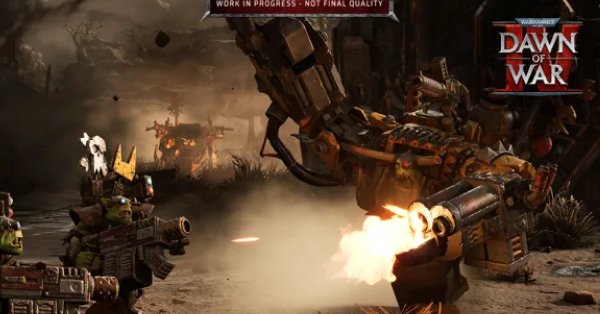
Warhammer 40000 Dawn of War 4 Ork Campaign

The campaign has always been the heart of Dawn of War for me epic RTS battles wrapped in wild, operatic Warhammer drama. But after going hands-on with the opening of Dawn of War 4, it’s clear this time things kick off louder, rowdier, and way more Orky.

Instead of slow-burning lore, the game opens with pure chaos:
Two rival Ork warbosses. One planet. One throne.

👑 Gorgutz – the legendary old warboss who loves massive war machines and overwhelming firepower.
🐗 Guzcutta – a younger, rebellious boss who favors beasts, speed, and savage close-quarters brutality.

Their rivalry sets the tone for the entire campaign, and you eventually get to choose who you back branching the story in different directions.

What really stands out:

  • Orks feel distinct thanks to the Waaagh! system and horde-style momentum.
  • Missions reward aggression and smart flanking.
  • Competitive objectives (like racing your rival to destroy an enemy base) add real tension.
  • Choices actually matter, shaping future missions and endings.

If the rest of the campaign maintains this energy, Dawn of War 4 might deliver one of the most dynamic RTS story experiences in years.

WAAAGH or WAR MACHINE?
Which boss would you side with Guzcutta or Gorgutz? 💬🔥

make it more detailed

🔥 Hands-On with the Ork Campaign in Warhammer 40,000: Dawn of War 4 Louder, Meaner, and More Chaotic Than Ever

The Dawn of War series has always shined brightest in its campaign mode where large-scale RTS combat meets the outrageous, operatic drama of the Warhammer 40K universe. After going hands-on with the opening stretch of Dawn of War 4, it’s clear this tradition continues… but with a heavier dose of attitude, speed, and Ork-fueled madness.

This time around, each of the four factions gets its own dedicated campaign thread that fits into a larger, interconnected narrative. Chronologically, the Orks kick things off and honestly, there’s no better faction to start a galactic mess.


🧨 The Spark That Ignites Everything

The story begins with an Ork invasion led by the infamous warboss Gorgutz, whose forces crash into the world of Kronus while hunting the Blood Ravens. Gorgutz expects to take command immediately but Kronus already has a boss.

Enter Guzcutta: a younger, scrappier Ork who has grown up ruling the local clans and earned their loyalty. Where Gorgutz prefers towering war machines and excessive firepower, Guzcutta leans into savage beasts, fast strikes, and raw aggression.

From the very first mission, the game establishes a powerful tension:
Two bosses.
Two philosophies of war.
Only one can rule.


⚙️ Learning What Makes Orks Orks

After a short tutorial featuring Space Marines and Imperial Guard, the Ork campaign becomes your real introduction to faction identity.

Key highlights:

  • Waaagh! System rewards constant aggression and momentum.
  • Squads grow larger and stronger through combat experience.
  • Emphasis on mobility, flanking, and overwhelming pressure.

Early enemies include Adeptus Mechanicus forces fragile in melee but deadly at range. This pushes you to:

  • Use Squighog Riders to circle and hit from behind
  • Leap over defenses with Stormboyz
  • Tank damage with tougher Beast Snagga Boyz

The result is a faction that’s easy to understand, but surprisingly deep if you want to optimize your tactics.


💥 When the Big Boss Arrives

Mission two shifts gears as Gorgutz’s massive space hulk finally crashes onto Kronus in a colossal explosion. Guzcutta’s boyz investigate the wreckage, fight off AdMech scavengers, and eventually encounter Gorgutz’s surviving forces.

Both warbosses claim credit.
Both believe they deserve the crown.

The rivalry is now official and it drives everything that follows.


🏁 One of the Best Missions So Far: Da Race

In this standout scenario, Guzcutta and Gorgutz race on opposite sides of the map to see who can destroy an AdMech base first.

Why it works:

  • You can’t rely only on brute force anymore
  • Efficiency, unit control, and smart routing matter
  • You can even harass Gorgutz to slow him down at the cost of your own progress

It’s tense, fast, and perfectly embodies Ork philosophy: win by smashing faster than the other guy.


🔀 Branching Paths & Multiple Endings

After this point, the campaign branches. Missions you choose will tilt power toward Guzcutta or Gorgutz, ultimately determining who becomes the true boss of Kronus.

Examples include:

  • Gathering scrap to build Deff Dreads
  • Taming massive beasts like the Squigasaur (which becomes Guzcutta’s mount and alters his playstyle)

The promise of multiple outcomes for just the first of four campaigns is huge and gives real replay value.


🧠 Final Thoughts

Dawn of War 4’s Ork campaign isn’t just loud and fun it’s smartly designed, mechanically engaging, and packed with personality. The rivalry between Guzcutta and Gorgutz adds emotional weight to what could’ve been a simple smash-fest.

If this opening chapter is any indication, Dawn of War 4 may deliver one of the strongest RTS campaigns in years.

Like: The Game Awards 2024 Nominees Unveiled: A Blend of Blockbusters and Indies

So…
🐗 Guzcutta’s beast-riding rebellion?
🤖 Or Gorgutz’s towering war machine empire?

Which boss are you backing? 💬🔥

Best Video to Text Tools 2026

Best video to text tools 2026

In 2026, converting video content into accurate, readable text is faster and more important than ever. From creators and educators to marketers and businesses, video-to-text tools help turn videos into transcripts, captions, subtitles, and searchable documents in minutes.

In this guide, we explore the best video to text tools in 2026, highlighting what they offer, who they’re for, and why they stand out.


What to Look for in a Video-to-Text Tool

Before choosing a tool, consider these key features:

  • High transcription accuracy
  • Support for multiple languages
  • Fast processing speed
  • Export formats like TXT, DOCX, SRT, and VTT
  • AI-powered summaries and keyword extraction
  • Integrations with platforms like YouTube, Zoom, and Google Drive

1. OpenAI Video Transcription API

Best for: Developers and custom automation

OpenAI’s video transcription API provides industry-leading accuracy powered by advanced AI models. It can handle long videos, detect speakers, and generate timestamps automatically.

Key Features

  • Speaker identification
  • Timestamped transcripts
  • Multilingual support
  • Summaries and keyword extraction

Ideal for: SaaS platforms, automated captioning systems, and custom apps.


2. Descript

Best for: Content creators and podcasters

Descript allows users to edit audio and video simply by editing text. This makes it one of the most creator-friendly video-to-text tools available.

Key Features

  • Real-time transcription
  • Text-based audio/video editing
  • Subtitle export (SRT, VTT)
  • Collaboration tools

Ideal for: YouTubers, podcasters, and social media creators.


3. Otter.ai

Best for: Meetings and lectures

Otter.ai excels at real-time transcription for meetings, interviews, and classroom recordings. It also organizes transcripts into searchable notes.

Key Features

  • Live transcription
  • Speaker recognition
  • Cloud storage and search
  • Sharing and collaboration

Ideal for: Students, teachers, and business teams.


4. Trint

Best for: Professional teams

Trint combines powerful AI transcription with collaborative editing tools, making it suitable for newsrooms and corporate environments.

Key Features

  • AI correction suggestions
  • Team collaboration workspace
  • Multiple export formats
  • Secure cloud storage

Ideal for: Journalists, editors, and enterprise teams.


5. Happy Scribe

Best for: Multilingual transcription

Happy Scribe supports over 100 languages and offers both automated and human-reviewed transcription services.

Key Features

  • Large language library
  • Subtitle and translation tools
  • Easy editor interface
  • Affordable plans

Ideal for: International creators and multilingual teams.


Quick Comparison

ToolAccuracyReal-TimeMulti-LanguageBest For
OpenAI APIHighNoYesDevelopers
DescriptHighYesLimitedCreators
Otter.aiHighYesLimitedMeetings
TrintHighNoLimitedTeams
Happy ScribeHighNoYesMultilingual

Tips for Better Transcriptions

  • Use high-quality audio whenever possible
  • Reduce background noise
  • Review and edit transcripts before publishing
  • Choose tools that support your primary language

Final Thoughts

The best video-to-text tools in 2026 make content more accessible, searchable, and reusable. Whether you’re building apps, creating videos, or capturing meetings, these tools can save time and boost productivity.

Like Top AI-Powered Phones of 2025